
Account and subscription
Tap the round button with your initial at the top left of any tab to open Account.
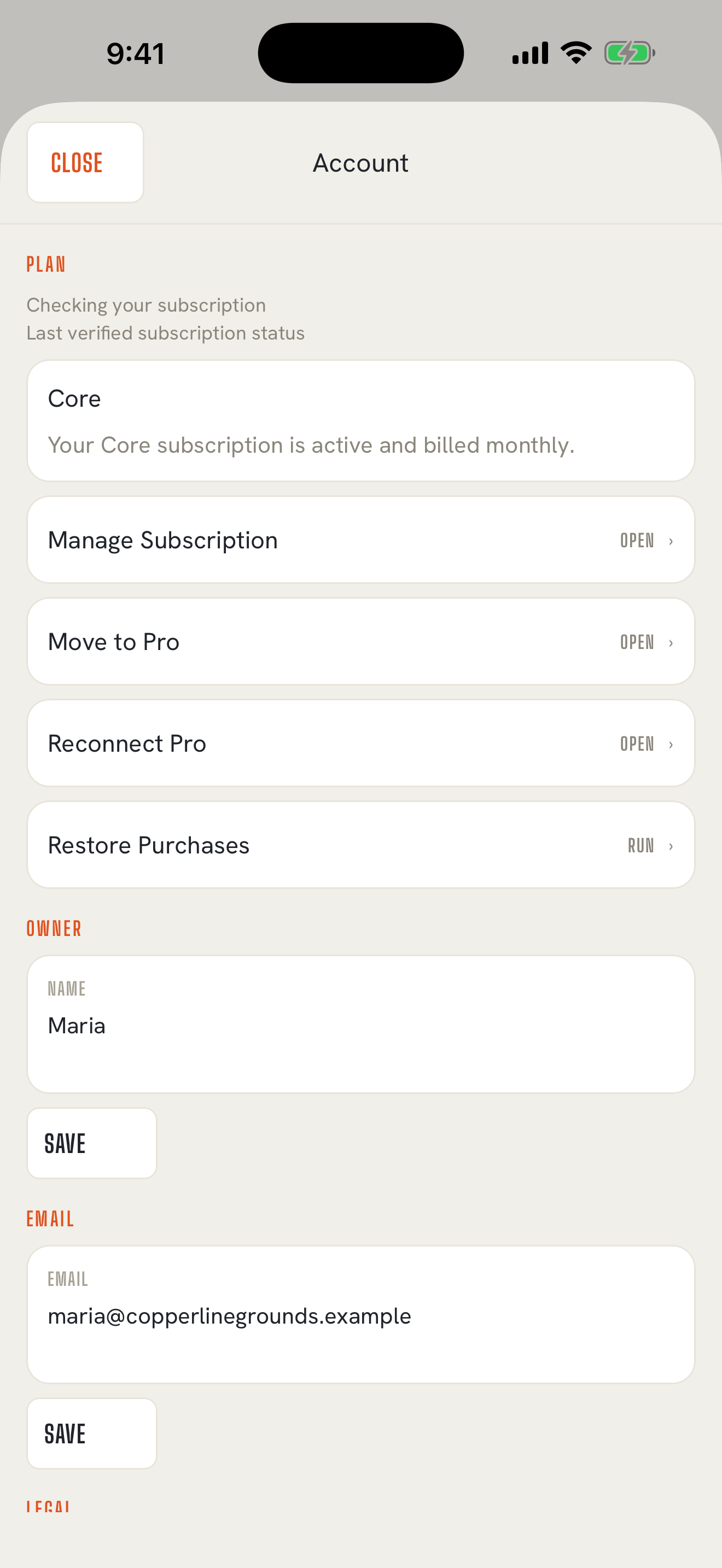
What's in Account
Back to contents- Plan: your plan, whether it's active, and whether it's billed monthly or yearly.
- Manage Subscription: change plans or cancel, through Apple.
- Move to Pro: for Core subscribers who want a dedicated Pro number for texting from the app. Pro
- Reconnect Pro: brings your Pro account back on a new phone. Pro
- Restore Purchases: pick up a subscription you already paid for, on a new phone or after reinstalling.
- Owner and Email: your name and email. Tap Save after changing either one.
- Terms of Use and Privacy Policy.
- Send Feedback: opens an email to support with your app version and iOS version filled in.
- Delete Account.
If you turned off notifications, Account also shows a row that takes you to iOS Settings to turn them back on.
Change plans or cancel
Back to contentsApple handles TextMyTask billing, so changes happen in your Apple Account:
- Open Settings on your iPhone.
- Tap your name, then Subscriptions.
- Tap TextMyTask, then change your plan or cancel.
You can also get there from Manage Subscription in Account.
Cancel at least 24 hours before your renewal date to stop the next charge. You keep full access until the end of the period you paid for.
If your subscription ends
Back to contentsYour records stay on your phone. You can still open and read every job, customer, worker, and reply, and you can archive or delete things. Account shows Subscription ended. Tap Resume Core there to resubscribe, and creating, editing, sending, and filing new replies start again as soon as you do.
New phone or reinstalled the app
Back to contentsSign in with the same Apple Account, open TextMyTask, and tap Restore purchase on the welcome screen or Restore Purchases in Account.
Restoring brings back your subscription. Your records come back from your iPhone backup, not from TextMyTask. How your data is kept
Refunds
Back to contentsApple handles App Store refunds. Go to reportaproblem.apple.com, sign in, choose Request a refund, and pick TextMyTask. If a problem on our side caused it, email support@textmytask.com too and we'll back you up.
Delete your account
Back to contents- Open Account.
- Tap Delete Account and confirm.
This permanently removes your account, your email record, and every job, customer, worker, task, message, and photo on this phone. It can't be undone. Deleting your account doesn't cancel your Apple subscription; cancel that in Settings.
On Pro, you'll see Delete your Pro account? first. Tap Continue with account deletion and confirm with the Apple Account you used for Pro. This also deletes your account content on our Pro server. We keep only limited texting consent and opt-out records, for 4 years, to show who agreed to get texts and who asked to stop. Everything else is deleted promptly. Privacy Policy